Your photo in
wooden hexagons
HexMosaic packs your picture into wooden hexagons in up to seven sizes, then gives you the numbered map, build list and cut files to make it. Free to design, and it runs in your browser.

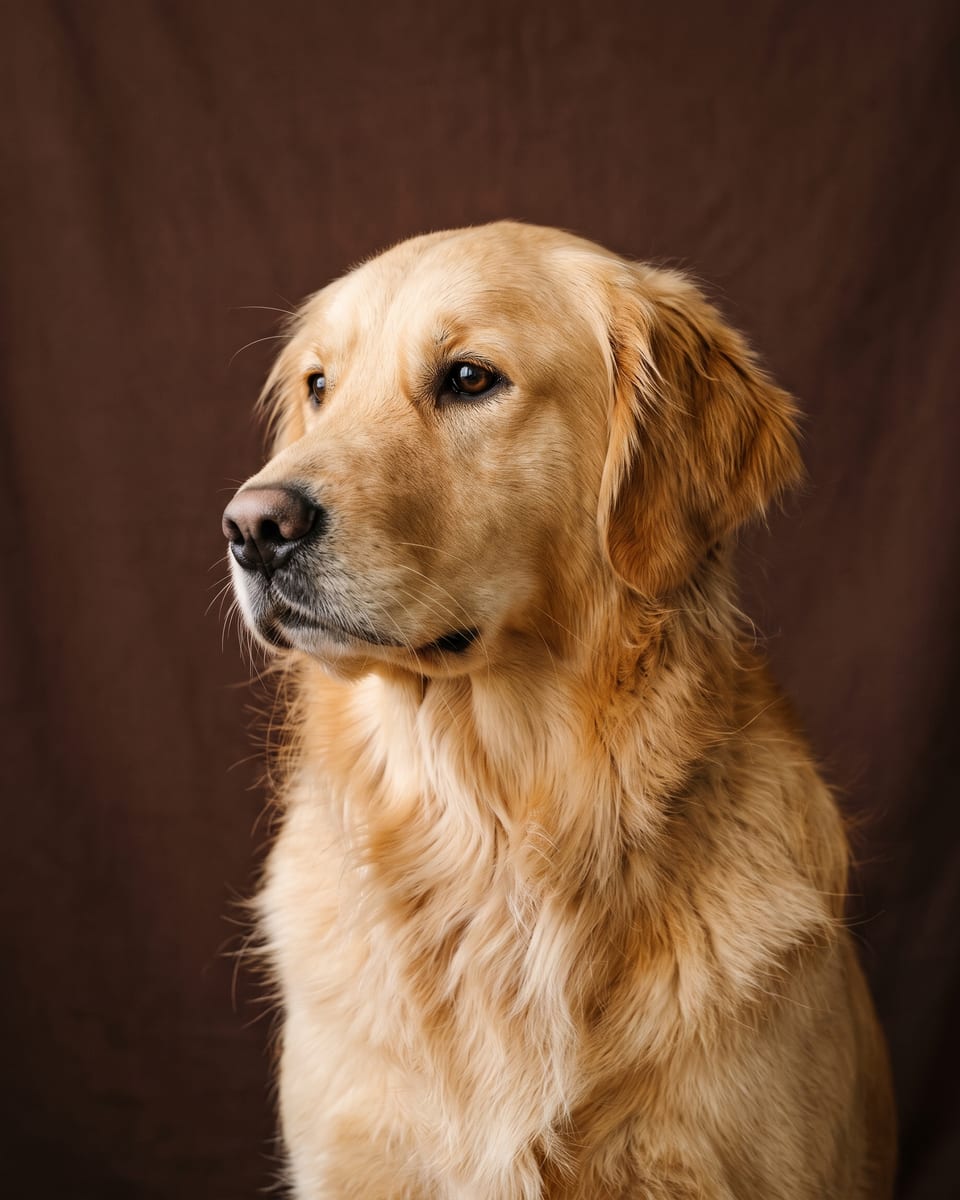
Retriever, 24 × 30 in: 6,924 pieces in 4 sizes, 6 woods.
From photo to build package
Four steps, all in the editor. The picture beside this column follows along.
Start with a photo
Any JPG or PNG. Pictures with clear light and dark areas work best: calm areas like sky become big pieces, faces and edges become small ones. Your photo is processed on your device and stays there unless you save the project to your account or send a build request.
Set the board and the pieces
Enter the finished size, anywhere from 4 to 72 inches a side, then pick the smallest and largest hexagon. Big pieces go where the picture is even; smaller ones fill in toward the detail.
For depth, switch on 3-D relief: every piece gets its own height between a shortest and a tallest you set, and you can turn the board in a 3-D view before you cut anything.
- 1/8″ · 4439
- 1/4″ · 1415
- 1/2″ · 524
- 1″ · 546
- 2″
- 4″
- 8″
Retriever uses 1/8″ to 1″ pieces. Each size gets its own colour in the cut file.

Choose a finish
Natural woods, painted basswood or stained basswood. HexMosaic picks the colours that match your photo from the woods in stock, a 32-colour paint set or 24 stains, and numbers each one. Swap any of them and the preview updates.
- Wenge787 pieces
- Ebony467 pieces
- Oak2164 pieces
- Mahogany1841 pieces
- White Ash670 pieces
- Walnut995 pieces
Painted basswood: 7 of 32 for the same photo
- Burnt Umber
- Raw Sienna
- Tan
- Light Flesh
- Mars Black
- Raw Umber
- Burnt Sienna
Stained basswood: 7 of 24 for the same photo
- Espresso
- Walnut
- Ebony
- Pecan
- Natural
- Golden Oak
- Honey
Get the build package
When the preview looks the way you would assemble it, download the package: every piece is numbered with its wood, paint or stain, like paint by numbers, and there are cut sheets ready for a CNC router or a laser.

The build package
Every file you need to cut and assemble the mosaic, made from the preview you tuned. These are the real files for the Retriever.
Free, no account
- Design and preview in your browser
- Piece counts on screen
- The 3-D view of a relief
- A preview image to save
$7 once per photo
- Every file in this section, for that photo
- Change the board, pieces, finish or heights and download again at no extra cost
- Paid through Stripe, no account needed
The cover, page 1 of 20 with the template Printable build guide
Cover, wood key, build list and the numbered map. Print it or save it as a PDF, and keep it on the bench.
Sheet R2·C2 of 16 on Letter (12 on A4) Full-size template
The numbered map at 1:1 on Letter or A4 paper, with trim lines and registration marks. Tape it together and glue each piece on its outline, like paint by numbers.

Corner of the Oak sheet: 2164 pieces, 1/8″ end mill, X‑Carve. 6 sheets in all. Cut sheets for CNC or laser
One file per wood per sheet, sized to your machine and spaced for an end mill, V-bit or laser, with a cut plan. Presets for X-Carve, Shapeoko and xTool; the files open in Easel, Carbide Create and LightBurn.
A close-up of the map Numbered map
Every piece with its wood number, and the key, as an SVG you can zoom into or print at any size to check a section.
Also in the package
- Cut file
- One SVG of the whole mosaic at 1:1, every piece in its place, one layer per piece size.
- Build list
- A CSV of the pieces of each size from each wood, with the board feet (or sheet area, for paint and stain) and epoxy to buy.
- Pieces
- A CSV of every piece with its number, size, wood and position, for a spreadsheet or your own tools.
- Height and crosscut lists, for 3-D designs
With relief on, the guide and a CSV give every piece’s height, the hexagon sticks to make and a crosscut list ordered by height, so each stop on the saw is set once. The Retriever in relief at 1/4″ to 1 1/2″:
- A1/4″839 pcs
- B1/2″964 pcs
- C3/4″2003 pcs
- D1″931 pcs
- E1 1/4″950 pcs
- F1 1/2″1237 pcs
1. Wenge
- 1″ hexagon277
- 1/2″ hexagon60
- 1/4″ hexagon114
- 1/8″ hexagon336
2. Ebony
- 1″ hexagon156
- 1/2″ hexagon25
- 1/4″ hexagon82
- 1/8″ hexagon204
3. Oak
- 1″ hexagon19
- 1/2″ hexagon171
- 1/4″ hexagon450
- 1/8″ hexagon1524
4. Mahogany
- 1″ hexagon38
- 1/2″ hexagon145
- 1/4″ hexagon372
- 1/8″ hexagon1286
5. White Ash
- 1″ hexagon42
- 1/2″ hexagon83
- 1/4″ hexagon198
- 1/8″ hexagon347
6. Walnut
- 1″ hexagon14
- 1/2″ hexagon40
- 1/4″ hexagon199
- 1/8″ hexagon742
6,924 pieces1.4 bd ft · 3 fl oz epoxy
For 0.25″ stock with 15% extra for waste, epoxy poured flush.
How the pieces fit
Hexagons in up to seven sizes, placed largest first. What happens between them and at the edges is part of the design, so here it is plainly.
Epoxy between the pieces
Regular hexagons of different sizes cannot close up completely where the sizes meet, so a mosaic always has small gaps. HexMosaic keeps every size on aligned grids to keep them small.
Filled with black epoxy, the gaps read as a dark grout line. In Retriever they are about 3% of the board, and the build list tells you how much to mix.

Or let the backing board show
Skip the pour and glue the pieces to a backing board instead. The gaps show the board, which gives a lighter, airier look.
Same pieces, same map. You choose when you build.

Two ways to finish the edge
Cut flush: pieces run past the edge and the whole board is trimmed square after glue-up, for a clean, full edge.
Kept inside: every piece stays within the board, with smaller pieces along the border and nothing to trim.
Rather have one made?
I build these mosaics by hand in my workshop. If you would rather give one than make one, design it here first: choose the picture, the size and the woods until the preview looks right.
Then send me the preview and the size you want. I’ll reply with a price and a date before anything is cut. Christmas orders are taken in the order they arrive, while there is time to build them.
HexMosaic
Send a build request
Start with
a photo
The editor opens on an empty board. Choose a picture and you will see it in wood within seconds.
Questions
Is it free? Designing is: the editor, the preview, the piece counts and the 3-D view cost nothing and need no account. The build package (printable guide, full-size template, cut file, cut sheets for CNC or laser, numbered map and lists) is $7 per photo, paid once, and you can download it again after changing any setting.
How do paying and unlocking work? In the editor, open the build package and choose Unlock. Stripe takes the $7 payment in a new tab while your design stays open, and the downloads unlock in the editor as soon as it goes through. One payment covers that photo at any board size, hexagon sizes or woods. The files are made in your browser, and the purchase is remembered in that browser; on another device, paste the payment reference from your confirmation page to restore it. Your Stripe receipt email is your proof of purchase.
What do I need to cut the pieces? Whatever you have. Every piece is counted by size and by wood, paint or stain, so a scroll saw, or hexagon stock and a mitre saw, will do, and the full-size template shows where each piece goes. With a CNC router or a laser cutter, the cut sheets give you one file per wood, paint or stain per sheet, spaced for your bit or beam, with presets for X-Carve, Shapeoko and xTool machines and files that open in Easel, Carbide Create and LightBurn.
Can I paint or stain instead of using hardwoods? Yes. Choose Paint or Stain in the editor and the pieces are cut from basswood and finished from a 32-colour acrylic paint set or 24 woodworking stains, picked to match your photo. The map, guide and lists then name the colour or stain for each number.
What is 3-D relief? An option that gives every piece its own height, between a shortest and a tallest you choose: taller where the photo is darker or lighter, or where the pieces are small. You can turn the board in a 3-D view before you build, and the package adds a height cut list and a crosscut list ordered by height.
What sizes are the hexagons? Seven sizes, from 1/8 inch to 8 inches across the flats, each twice the one before. You choose the smallest and the largest for each design.
Why are there gaps? Hexagons of different sizes cannot tile together without small spaces where the sizes meet. Fill them with epoxy, or glue onto a backing board and let it show.
What happens at the edges? Your choice: pieces run past the edge and are cut flush after glue-up, or every piece stays inside the board, with smaller pieces along the border.
Which woods can I use? The palette is suggested from woods in stock: birch, maple, yellowheart, white ash, zebrawood, oak, cherry, mahogany, padauk, purpleheart, walnut, bloodwood, wenge and ebony. You can swap any of them and choose how many to use.
How big can a board be? Anywhere from 4 to 72 inches on a side. Larger boards with small pieces mean many more pieces to cut, and the editor shows the count as you go.
Is my photo uploaded? Not while you design. The mosaic is worked out in your browser and the picture stays on your device. If you sign in and save a project, a reduced copy of the photo is stored with it in your account; if you send a build request, it goes by email to the maker. Nothing else sends it anywhere.
Can you build it for me? Yes. Design it here and send a build request from the build package, or use the form above. You will get a price and a date by email before anything is cut.